What are folders?
A folder is a group of feeds. Open it and you read the articles of every feed in it as one list, so you can read one subject at a time.
Folders live in the sidebar under Feeds, below Newsfeed, which always shows every feed you follow.
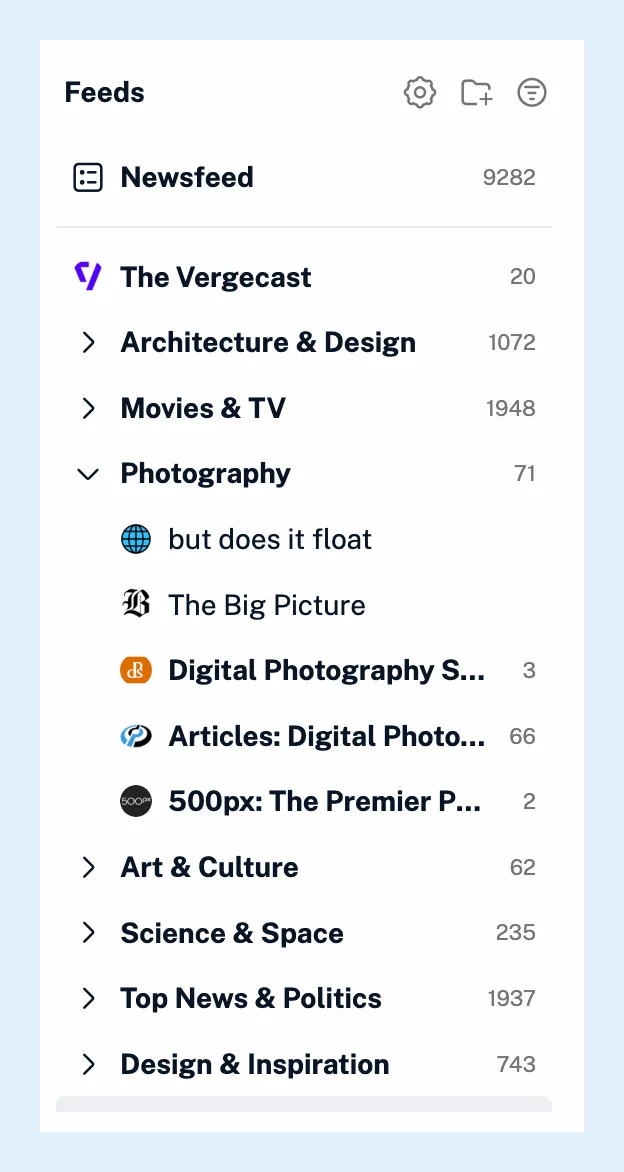
Put feeds in folders
A feed can be in as many folders as you like, and a feed that's in no folder sits at the top level of the sidebar. Folders stay at one level, side by side. Each folder shows its unread count, and reading an article in one folder marks it as read everywhere, because the feed is the same wherever it appears.
You create a folder with the Create folder icon next to the Feeds heading, and you move feeds in and out by dragging them or with Add to folder in a feed's right-click menu. The video walks through it.
Change a folder's settings
Right-click a folder and choose Folder properties to see its feeds and its settings:
- Keep unread sets how long articles stay unread. They're marked as read after 30 days, and with Pro you can shorten that to as little as a day, so a news folder never piles up.
- Output feeds turns the folder into an RSS or JSON feed or an HTML clip for your website.
- Remove duplicate articles filters out the same story arriving from several feeds.
- Remove YouTube Shorts keeps the Shorts out of a folder of YouTube channels.
The same menu offers Create rule and Filter folder, so a rule can act on every article that lands in the folder, and Unfollow all to leave every feed in it. On Team plans, a team admin can turn a folder into a Team folder shared with the whole team with Create Team folder.
Folders and tags
A folder holds feeds, while a tag holds the articles you choose to keep. Read your feeds in folders, and tag the articles you want to come back to. The difference between a folder and a tag has the details.
Plans
Folders work on every plan. The unread duration, output feeds, duplicate filters and the YouTube Shorts filter are Pro features.
Can't find an answer? Contact support