How do I create a Track changes feed?
Click Add feed in the tab bar, choose Track changes feed, paste the page's address and click Load web page. On Visual, drag a box around the area and set the Threshold. On Text, click the elements to watch. Then click Follow feed.
Load the page
- Click Add feed in the tab bar and choose Track changes feed.
- Paste the page's address in Paste web page URL and click Load web page.
If a cookie banner or an overlay covers the area, click the gear icon (Page settings) and use Remove cookie consent or Select & remove element under Blocked content. Page layout switches between the desktop and the mobile version of the page.
Watch how an area looks
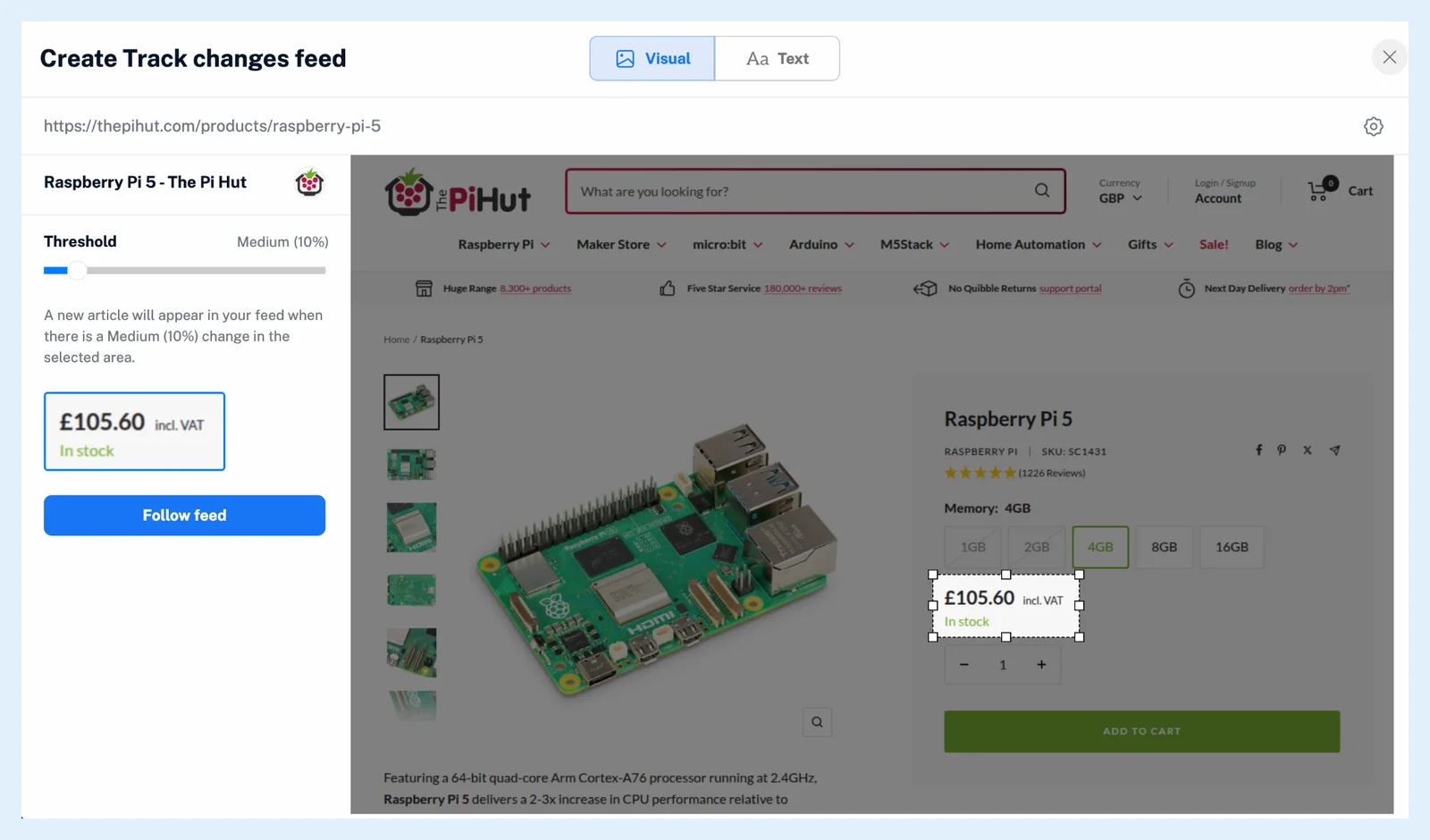
- Stay on Visual and drag a box around the area, for example a price and its stock line.
- Set the Threshold from 1 to 100%. The sentence beside it says what you set, for example a Medium (10%) change.
- Check the preview image of your selection and click Follow feed.
Watch the text of an element
- Switch to Text and click a text element to select it.
- Use Control+Click (⌘+Click on a Mac) to add more elements. The builder lists each one you picked.
- Click Follow feed, which works once at least one element is picked.
The first time you follow a Web feed or a Track changes feed, Inoreader shows Follow Web feed and asks you to accept that websites can change and stop the feed. Tick the checkbox and click Follow feed.
Read the new feed
The feed is added and opens in the reading panel. Each change arrives as an article. See what Track changes can monitor. To get a notification per change, right-click the feed and choose Create rule. See what actions rules can perform. To make a Visual feed less sensitive later, right-click it, open Feed properties and raise Minimum image difference under Tracking settings. To follow a list of new items instead, see how to create a Web feed.
Plans and limits
Track changes is a Pro feature: Pro includes 20 Web feeds and Track changes feeds together, and a Team with a shared pool shares 150 or 200 across the team. The feature page Follow any website, even without a feed describes it, and the post Improved Web feeds & Track changes shows the current builder.
Can't find an answer? Contact support