Why is the translation option not offered?
The Translate article button and the Q shortcut show only when your settings offer a translation for that article. With Offer translations on Never no article gets the button, and with the default Always, except languages you read an article in one of your Languages you read gets none. Both are set under Preferences > Settings > Article translations.
Check the setting
- Click the gear (Preferences) at the bottom of the tab bar and go to Settings > Article translations.
- If Offer translations is Never, choose Always, except languages you read or Always.
- With Always, except languages you read, remove the article's language from Languages you read, or choose Always.
- Open the article again. The Translate article button is in its button row.
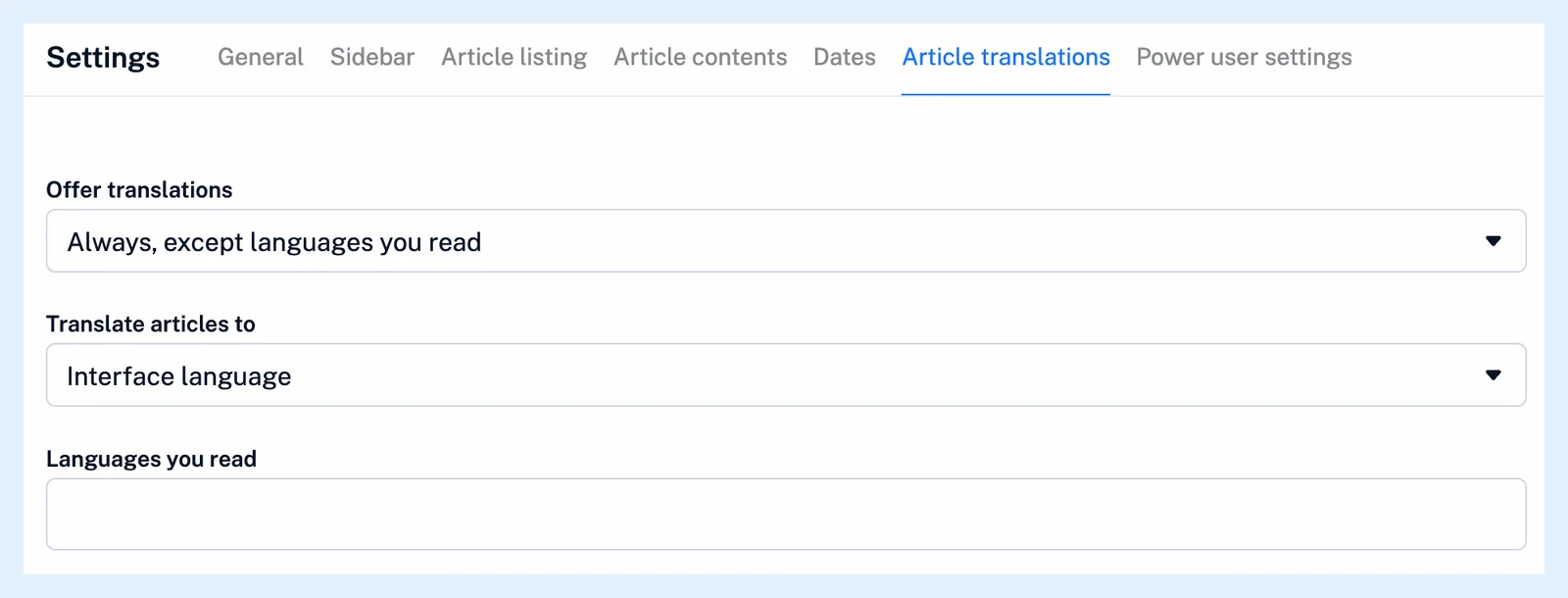
Changes save at once. Can I control when article translations are offered? explains what each setting does.
The reasons for a missing button
The button is an icon in the open article's button row, with the tooltip "Translate article (Hotkey: Q)". It isn't shown in the article list. Inoreader adds it only when the article is offered for translation, and three things decide that.
Offer translations is Never: no article gets the button and Q does nothing. Offer translations is Always, except languages you read and the article's language is one you read: while Languages you read is empty, it stands for your interface language, so with an English interface, English articles get no button. The check compares the language detected for the article, so an article the detector read as one of your languages gets none either. Always avoids depending on the detection. And a publisher that doesn't allow translation never gets the button.
An article you already translated keeps its bar and button whatever the setting. The Free daily limit is not a reason: the button stays, and after the day's 10 translations the bar says "No translations left today. Upgrade to Pro for unlimited translations."
Translate articles to, the target language, never hides the button. Only Offer translations and Languages you read do.
Messages after translating
An article that is already in your target language comes back unchanged, and a translation that fails shows "Cannot translate article. Please try again later." How do I translate an article? has the steps.
Plans and limits
The settings and the button are available on every plan. Free accounts get 10 translations a day and Pro has no daily limit, as What are article translations? and the feature page Read any feed in your language explain.
Can't find an answer? Contact support