Can I create multiple dashboards?
Yes, you can create as many dashboards as you like, on every plan. Every account starts with Default Dashboard, and each dashboard you add becomes a tab next to it at the top of the Dashboards page.
Create a dashboard
- Click Dashboards in the left tab bar, or press G then D.
- Click the plus button at the end of the dashboard tabs.
- Choose Create new for an empty dashboard, or Clone current for a copy of the one you're on.
- Type a Dashboard name. For a new dashboard, pick Single column, Two columns or Three columns under Choose layout.
- Click Create dashboard. The dashboard opens as a new tab, and you fill it with Add widget at the bottom of a column.
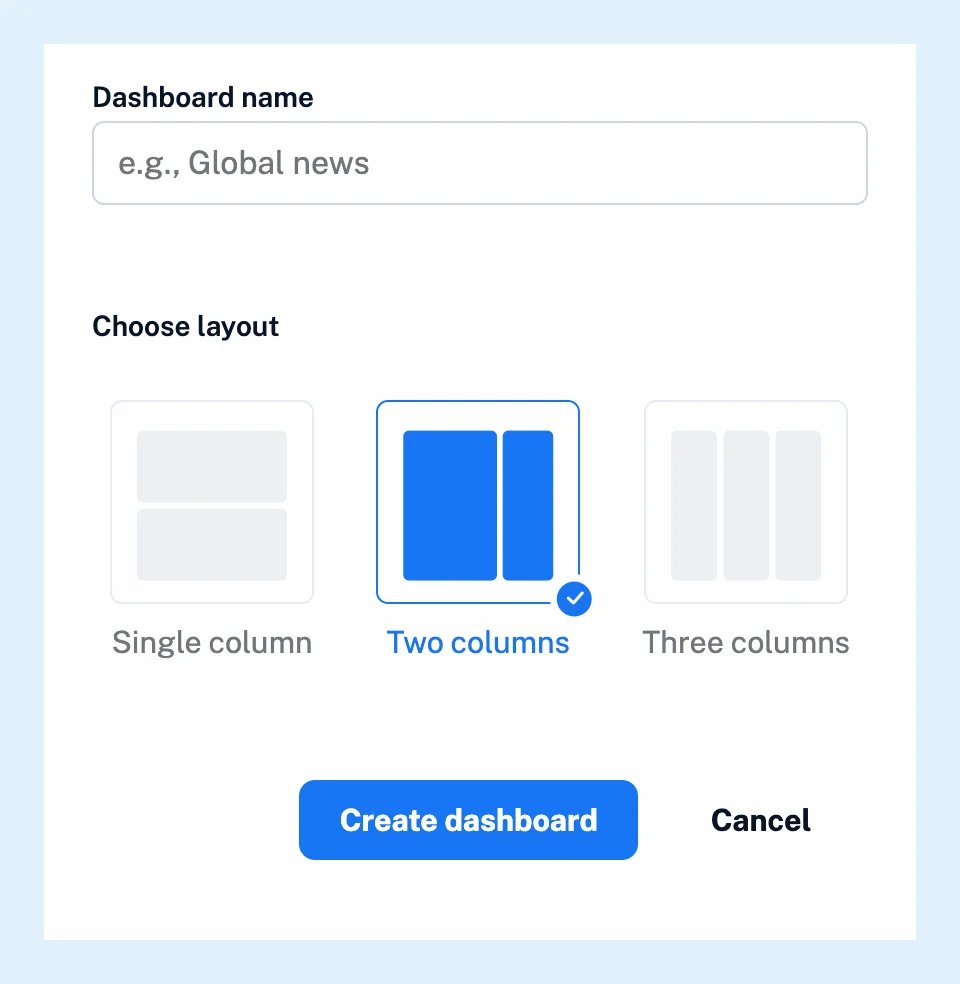
The video shows these steps, and customizing dashboard layouts and widgets explains what to add next.
Choose a layout
Two columns, the preselected choice, gives you a wide left column and a narrow right one, and Three columns gives three equal columns. On narrow screens the columns stack one under the other. The layout is chosen when you create the dashboard, so for a different layout, create a new dashboard and add your widgets there.
Clone a dashboard
The copy keeps the layout and every widget with its settings, and it opens as soon as you create it. The dialog prefills the name, so change it if you like and click Create dashboard.
Switch between dashboards
Click a tab to open that dashboard. Tabs that don't fit in the row are listed under a More menu at its end. Dashboards opens on the dashboard you viewed last. The three-dot menu at the top right of the page holds Rename current dashboard and Delete current dashboard. The delete option is hidden while you have only one dashboard. The same menu lets you set a dashboard as your start page.
Plans
Dashboards are on every plan, with no limit on their number. What dashboards are introduces them. Team plans add shared Team dashboards, which team admins create.
Can't find an answer? Contact support