Can I continue reading where I left off?
Yes, for the articles you saved to Read later or moved to the Archive. Inoreader records where you stop in each one and, when you open it again, scrolls straight back there. A ring in the article's toolbar shows how far you are, the row in Read later reads "Resume (27 min left)" or "Finished", and the In progress chip lists everything you've started.
Continue an article
- Open Saved > Read later (G then F).
- Click the In progress chip to see the saved articles you've started and haven't finished.
- Open an article: it scrolls to where you stopped, with no prompt.
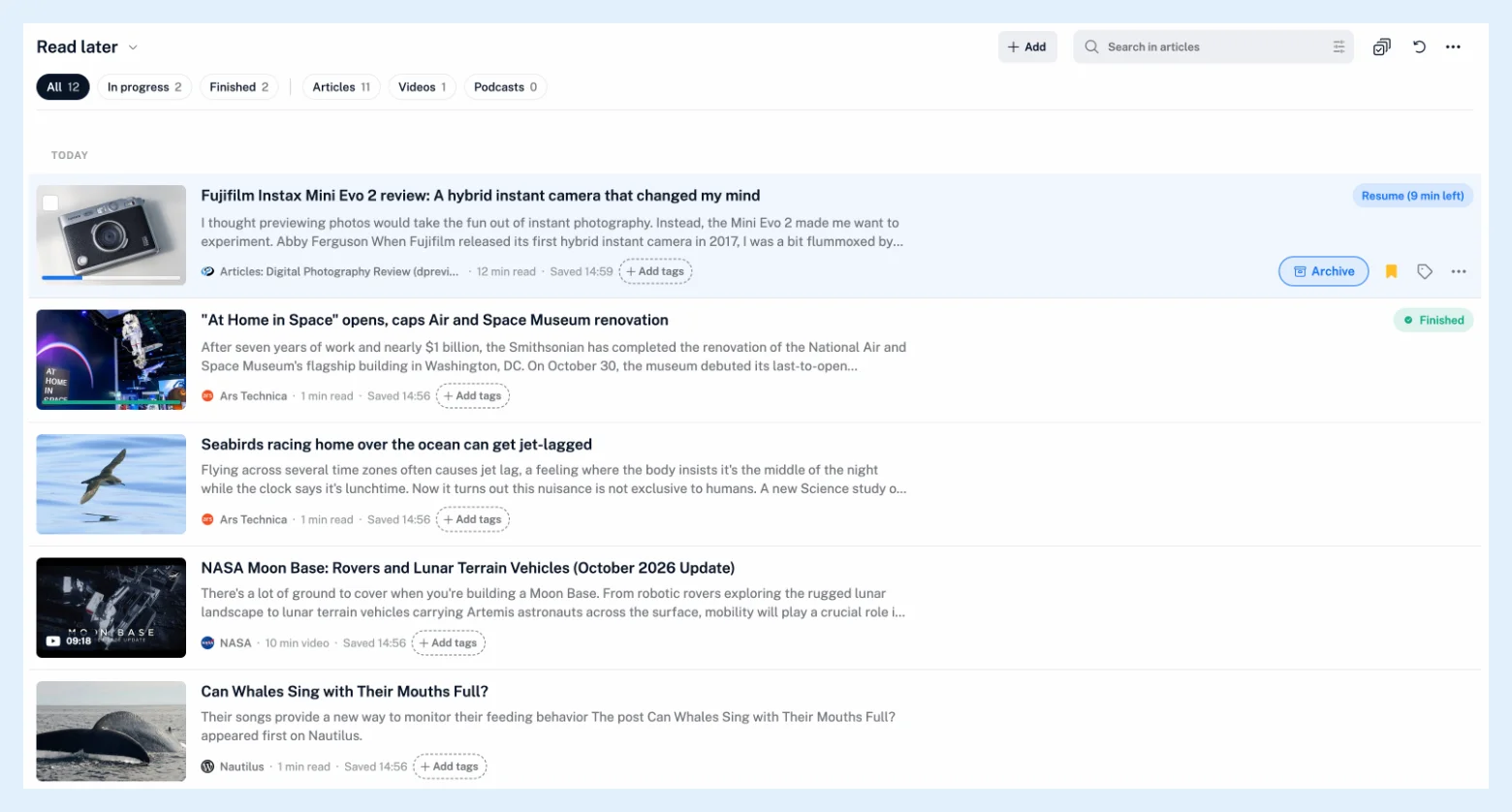
Only saved articles are tracked. Save an article while you're reading it and the tracking starts from where you are; a saved article opened from a feed or folder is tracked there as well.
The progress ring
The ring at the right end of the open article's toolbar carries the percentage, and a checkmark once you've finished. Point at it or click it for the time left, the words you've read of the whole, Mark as finished, Start over, which clears the progress and scrolls back to the title, and, in Read later, the Archive when finished switch. A thin marker beside the paragraph you're reading moves with you. It works in every layout, in the article window, the Column pane and the page.

The percentage
The percentage is the share of the article's text you've scrolled past; comments, attachments and players after the text don't count. Your place is recorded once you stay put for two seconds, so a quick look back isn't saved. Scrolling back moves the point where the article reopens but not the percentage; stay above your furthest point for 30 seconds and the percentage drops to where you are. An article counts as finished at 95%, or when you leave it if it's shorter than one screen, and in Read later "You finished this article." then offers Archive and Keep in Read later. A saved YouTube video or podcast episode reopens at the position where you stopped, and playing it anywhere in Inoreader updates the progress; listening with text-to-speech doesn't.
Turn reading progress off
Switch off Reading progress in the More menu of Read later or the Archive, or under Preferences > Settings > Article contents. Nothing is recorded then, and the ring, the marker, the pills and the status chips go away; what was recorded comes back when you turn it on again. Progress is kept on your account and shared by every browser where you use Inoreader on the web. Moving an article to the Archive keeps its progress, and removing it from both lists deletes it.
Articles you opened but didn't save are under Recently read in the profile panel, behind the avatar at the bottom of the tab bar. An article you marked as read by mistake is a different case, covered in how to restore articles accidentally marked as read.
Plans
Reading progress works on every plan, as the feature page Save articles and read them when you have time says. Read later describes the list it lives in.
Can't find an answer? Contact support